
Chatbots on Your Website: 24/7 Customer Support and Automated Lead Collection
Discover how chatbots can streamline customer communication around the clock. Explore practical benefits and implementation strategies.
Read article
2026-10-09
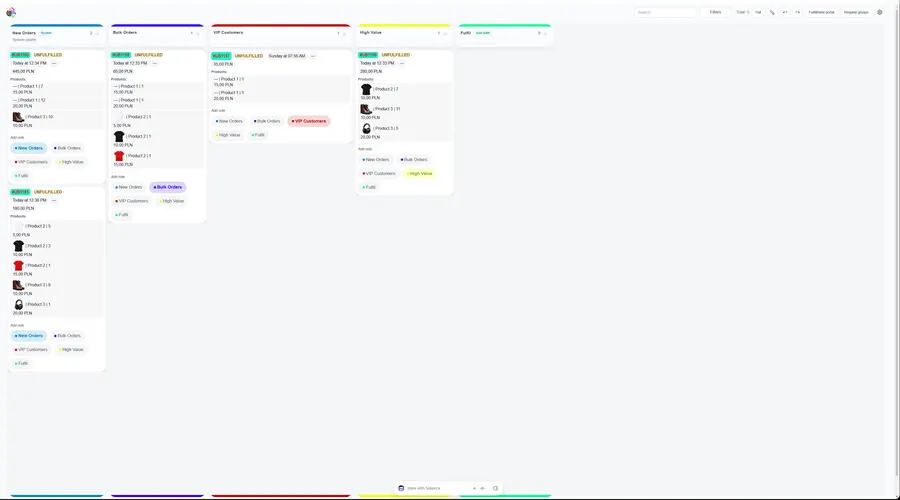
An app inside the Shopify admin: every order is a card with products, photos and amounts. The team moves cards between its own columns, and fulfilment requests go to suppliers grouped by location.
10
quick actions on a card
5
card layouts
3
screens: board, request groups, portal
In the standard Shopify order list it is hard to see at a glance which orders are new, which are bulk or VIP, and which are already waiting for a supplier. Fulfilment requests were sent one order at a time, and the supplier had no clear view of what to ship.
In
Shopify ordersProducts and metafieldsLocations and suppliersUniBoard
Board, card editor, request rules
Result
Orders by stageFulfilment requestsSupplier portalColumns for your process and rules for where new orders go.
Order and product fields, metafields, layout and quick actions.
Locations, request groups with sending rules and the fulfilment portal.
Technologies
Related services
Everything else is on us. You see progress after each stage and pay after accepting it.
Describe the task in your own words. We'll reply with questions or a plan and name the price and deadline before we start.
Orders from every channel in one list, stock updated everywhere within a minute, an e-invoice for every paid order.
≤ 1 minstock sync
Read the caseCatalogue, online payment, shipping labels from the order and a simple admin panel. The owner stops taking orders in direct messages.
3–5 wksto launch
Read the casePrices in € · delivery to DE, CZ, PL
Each country gets its own language, currency, VAT rate, payment methods and couriers — and Google sees every version separately.
3countries in one store
Read the caseDiscover how chatbots can streamline customer communication around the clock. Explore practical benefits and implementation strategies.
2026-10-09

Exploring how CRM features can significantly enhance your team's productivity by optimizing workflows and improving customer interactions.
2026-09-01

Discover how to effectively select a CRM system for your small business by considering essential criteria and tips for success.
2026-09-01